Plain C# Entry point
VContainer allows plain C# to be the starting point for application processing.
Using it instead of MonoBehaviour, which has a lot of features, can help you build a simple control flow.
class FooController : IStartable
{
    void IStartable.Start()
    {
        // Do something ...
    }
}
builder.RegisterEntryPoint<FooController>();
See register
VContainer does this with its own PlayerLoopSystem.
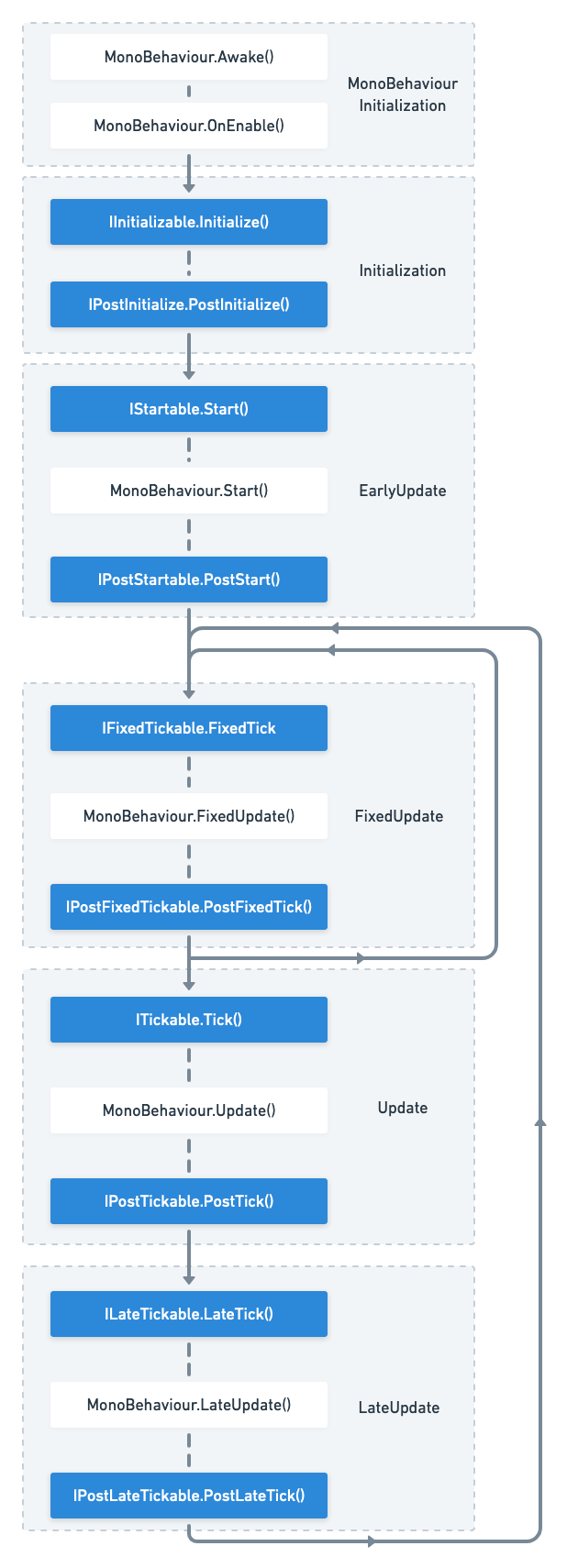
If you register a class that implements the marker interface, it will be scheduled in Unity's PlayerLoop cycle.
Since it uses PlayerLoopSystem, it works even if you register at any time (e.g. IStartable etc).
Available interfaces
| VContainer entry point | Timing |
|---|---|
IInitializable.Initialize() | Immediately after building the container |
IPostInitializable.PostInitialize() | Late IInitializable.Initialize() |
IStartable.Start() | Nearly MonoBehaviour.Start() |
IAsyncStartable.StartAsync() | Nearly MonoBehaviour.Start() (async) |
IPostStartable.PostStart() | After MonoBehaviour.Start() |
IFixedTickable.FixedTick() | Nearly MonoBehaviour.FixedUpdate() |
IPostFixedTickable.PostFixedTick() | After MonoBehaviour.FixedUpdate() |
ITickable.Tick() | Nearly MonoBehaviour.Update() |
IPostTickable.PostTick() | After MonoBehaviour.Update() |
ILateTickable.LateTick() | Nearly MonoBehaviour.LateUpdate() |
IPostLateTickable.PostLateTick() | After MonoBehaviour.LateUpdate() |
And:
IDisposable: Disposed with the container. (ForLifetime.Singleton/Lifetime.Scoped)
async
IAsyncStartable is available as a variant of IStartable.
It has the same timing as IStartable, but async Awaitable StartAsync() is available.
The return type Awaitable differs depending on the environment:
| Condition | Return Type | Note |
|---|---|---|
VCONTAINER_UNITASK_INTEGRATION enabled | Cysharp.Threading.Tasks.UniTask | Recommended if you use UniTask. |
| Unity 2023.1 or newer | UnityEngine.Awaitable | Uses Unity's built-in Awaitable. |
| Others | System.Threading.Tasks.Task |
If VCONTAINER_UNITASK_INTEGRATION is disabled and you are using Unity 2020 or older, IAsyncStartable will not be executed (it is ignored by VContainer's loop). To use IAsyncStartable in older Unity versions, you must install UniTask.
If you are a UniTask user, you can also choose the UniTask version of StartAsync.
UniTask integration
Handling Uncaught Exceptions
On the application side, exceptions thrown in processes such as Start() and Tick() cannot be caught from the outside.
By default, VContainer logs unhandled exceptions as UnityEngine.Debug.LogException.
As another option, you can register a callback for each LifetimeScope.
builder.RegisterEntryPointExceptionHandler(ex =>
{
    // ...
});
Default error logging will be skipped if you are using the RegisterEntryPointExceptionHandler.
Multiple Independent Systems
VContainer's entry points are designed to be composable. If you have multiple independent systems (e.g., an InputSystem, a GameLoop, a NetworkManager), you should create separate classes implementing the necessary lifecycle interfaces (IStartable, ITickable, etc.) for each system and register them as entry points.
public class InputSystem : IStartable, ITickable
{
    public void Start() { /* Initialize input */ }
    public void Tick() { /* Update input state */ }
}

public class GameLoop : IStartable
{
    readonly InputSystem input;
    public GameLoop(InputSystem input) { this.input = input; }

    public void Start() { /* Start game */ }
}
// Register multiple entry points
builder.RegisterEntryPoint<InputSystem>();
builder.RegisterEntryPoint<GameLoop>();
VContainer will automatically collect all registered entry points and execute them.
You can also use UseEntryPoints to group registrations, which helps organize your configuration code.
builder.UseEntryPoints(entryPoints =>
{
    entryPoints.Add<InputSystem>();
    entryPoints.Add<GameLoop>();
});